How to fix yfinance rate limit errors in 2026 (YFRateLimitError)
Disclosure: I have no position in ASML. I also hold diversified funds (IWDA, QQQ, SPY, VWRL) that may include ASML. Positions checked on 7 November 2026.
A yfinance rate limit error can come from the HTTP session you hand the library, before you have sent a meaningful amount of traffic. One call for five days of ASML prices through a plain requests session sent 5 requests, got 4 HTTP 429 answers and raised YFRateLimitError. The session yfinance builds itself fetched five years of ASML history in 2 requests and returned 1,255 trading days. This is the printed output of the code below, run on yfinance 1.7.0:
YFRateLimitError: Too Many Requests. Rate limited. Try after a while.
404 fc.yahoo.com
429 query1.finance.yahoo.com/v1/test/getcrumb
429 query2.finance.yahoo.com/v8/finance/chart/ASML
429 query2.finance.yahoo.com/v1/test/getcrumb
429 query2.finance.yahoo.com/v8/finance/chart/ASML
default User-Agent: python-requests/2.34.2
rows, columns: (1255, 7)
200 query2.finance.yahoo.com/v8/finance/chart/ASML
200 query2.finance.yahoo.com/v8/finance/chart/ASML
What a yfinance rate limit error looks like in 1.7.0
Print the version and the global config first. Both decide what you see when Yahoo refuses a request.
import os
import time
import random
import logging
from importlib.metadata import version
from pathlib import Path

import requests
import pandas as pd
import yfinance as yf
from yfinance.exceptions import YFRateLimitError

print("yfinance", yf.__version__, "| curl_cffi", version("curl_cffi"))
print("network:", yf.config.network.data)
print("debug:", yf.config.debug.data)
print("error text:", YFRateLimitError())
yfinance 1.7.0 | curl_cffi 0.16.3
network: {'proxy': None, 'retries': 0}
debug: {'hide_exceptions': True, 'logging': False}
error text: Too Many Requests. Rate limited. Try after a while.Two defaults matter here. retries is 0, and the yfinance config documentation describes it as an “automatic retry for transient network errors”, so it does nothing for a 429. The one retry you do get on a 429 is built in: after any error status, yfinance switches to its other cookie method and sends the request once more, which is the second crumb and chart pair in the log below. hide_exceptions is True, so many failed calls log a message and return an empty result in place of a traceback. .history() and .info raise the rate-limit error anyway, but the financial statement tables (.financials, .balance_sheet, .cashflow) swallow it and return an empty frame, and yf.download() catches it per ticker (Step 4). The message itself, “Too Many Requests. Rate limited. Try after a while.”, is the same whatever caused the 429.
Step 1: count the requests behind each call
The only way to tell what triggered it is to look at the requests. The code wraps a session class so it records every request yfinance sends and the status code that came back. yfinance accepts a requests session or a curl_cffi session (curl_cffi is installed with yfinance), so the same wrapper works for both.
def counting(session_class):
    """Subclass a session class so it records every request yfinance sends and the status code."""
    class Counting(session_class):
        def request(self, method, url, *args, **kwargs):
            response = super().request(method, url, *args, **kwargs)
            self.log.append((response.status_code, url.split("?")[0].replace("https://", "")))
            return response
    return Counting


def asml_history(session, **kwargs):
    """ASML daily history through `session`; returns the frame or the error, plus the request log."""
    session.log = []
    try:
        result = yf.Ticker("ASML", session=session).history(**kwargs)
    except YFRateLimitError as err:
        result = err
    return result, list(session.log)


plain = counting(requests.Session)()
result, plain_log = asml_history(plain, period="5d")
print(type(result).__name__ + ":", result)
for status, url in plain_log:
    print(status, url)
print("default User-Agent:", plain.headers["User-Agent"])

CurlSession = type(yf.data.new_session())  # the curl_cffi session yfinance builds when you pass none
browser = counting(CurlSession)(impersonate="chrome")
result, first_log = asml_history(browser, start="2021-11-01", end="2026-11-01")
print("rows, columns:", result.shape)
for status, url in first_log:
    print(status, url)
YFRateLimitError: Too Many Requests. Rate limited. Try after a while.
404 fc.yahoo.com
429 query1.finance.yahoo.com/v1/test/getcrumb
429 query2.finance.yahoo.com/v8/finance/chart/ASML
429 query2.finance.yahoo.com/v1/test/getcrumb
429 query2.finance.yahoo.com/v8/finance/chart/ASML
default User-Agent: python-requests/2.34.2
rows, columns: (1255, 7)
200 query2.finance.yahoo.com/v8/finance/chart/ASML
200 query2.finance.yahoo.com/v8/finance/chart/ASMLApart from the cookie request to fc.yahoo.com, which got a 404, every request from the plain session got a 429, the first crumb request included. yfinance’s own session, run right after from the same machine, got 200s, so the session made the difference in this test. The plain session differs from yfinance’s own in several ways: it announces itself as python-requests/2.34.2, sends none of a browser’s other headers, and lacks the browser TLS fingerprint and HTTP/2 settings. yfinance’s HTTP backend module uses curl_cffi “for browser TLS impersonation”, sets a browser User-Agent on its plain requests fallback, and still warns that with that fallback “Yahoo Finance may rate-limit or block this client.” The curl_cffi session that impersonates Chrome fetched five years of ASML in 2 requests: one to look up ASML’s exchange timezone, which yfinance then keeps in its local cache, and one for the prices. No crumb request appears because the session reused the crumb the failed run had left behind (more on that in Step 2); in a fresh script, expect one more.
Here the fix is to stop passing a session. A common workaround in older code builds a requests.Session with a custom User-Agent, or a requests_cache session, and passes it to yf.Ticker or yf.download. In 1.7.0 the library’s data module refuses caching sessions outright with “Caching sessions (e.g. requests_cache) are not supported. Solution: stop setting session, let yfinance handle.” Call yf.Ticker("ASML") without the session argument and yfinance builds the curl_cffi session for you. The code here passes one only so it can count.
Step 2: send fewer, bigger requests
If the default session still gets 429s, request volume is the next thing to check. The same counter shows what each calling pattern costs.
years = [(f"{y}-11-01", f"{y + 1}-11-01") for y in range(2021, 2026)]
loop_requests = 0
for start, end in years:
    _, log = asml_history(browser, start=start, end=end)
    loop_requests += len(log)
_, one_log = asml_history(browser, start="2021-11-01", end="2026-10-31")
print("five one-year calls:", loop_requests, "requests")
print("one five-year call:", len(one_log), "request")

browser.log = []
info = yf.Ticker("ASML", session=browser).info
info_log = list(browser.log)
print(".info fields:", len(info))
for status, url in info_log:
    print(status, url)
five one-year calls: 5 requests
one five-year call: 1 request
.info fields: 180
401 query2.finance.yahoo.com/v10/finance/quoteSummary/ASML
200 query1.finance.yahoo.com/v1/test/getcrumb
200 query2.finance.yahoo.com/v10/finance/quoteSummary/ASML
200 query1.finance.yahoo.com/v7/finance/quote
200 query1.finance.yahoo.com/ws/fundamentals-timeseries/v1/finance/timeseries/ASMLOnce the timezone is cached, price history costs one request per call, for one-year and five-year ranges alike. The five yearly calls took 5 requests and the single five-year call took 1. Ask for the whole range once and slice it in pandas. .info is the expensive one. It took 5 requests for one ticker. The first, a 401 on the quote summary endpoint, is a leftover from the failed run above: the plain session’s 429 left a bad crumb (the token Yahoo ties to your cookie) in yfinance’s shared state, so yfinance fetched a new crumb and retried. The remaining three, after the new crumb, are the data itself, from the quote summary, quote and fundamentals time series endpoints. A screener that reads .info for a list of tickers pays those three requests per name, plus a crumb whenever yfinance needs a new one. For prices alone, .history() is the cheap call, and filed figures such as revenue come from the SEC in a single request per company (Step 6).
yf.download() sends one history request per ticker (plus the timezone lookup for a ticker it has not seen), and with its default threads=True it sends them in parallel. For long lists, threads=False makes it send them one after another, which is slower and less likely to trip the limit. The 1.8.0 changelog lists a fix to “Honour download(threads=N) concurrency cap”, so on 1.7.0 threads=False is the setting to trust.
Step 3: back off when the 429 is real, and stop when it is not
A volume limit clears if you wait, so a retry loop with exponential backoff and a little random jitter is the right tool for it. The loop also needs a point where it gives up.
def with_backoff(fetch, attempts=3, base=1.0):
    """Call fetch(); after a YFRateLimitError wait base * 2**n seconds plus jitter, then try again."""
    for n in range(attempts):
        try:
            return fetch()
        except YFRateLimitError:
            if n == attempts - 1:
                raise
            wait = base * 2 ** n + random.uniform(0, 0.5)
            print(f"attempt {n + 1}: rate limited, waiting {wait:.1f} s")
            time.sleep(wait)


def strict_history(session, **kwargs):
    """ASML history that raises the rate-limit error instead of returning it."""
    return yf.Ticker("ASML", session=session).history(**kwargs)


plain.log = []
t0 = time.perf_counter()
try:
    with_backoff(lambda: strict_history(plain, period="5d"))
except YFRateLimitError:
    print("gave up after 3 attempts")
backoff_seconds = time.perf_counter() - t0
backoff_requests = len(plain.log)
print(f"{backoff_requests} requests, all {set(s for s, _ in plain.log)}, {backoff_seconds:.1f} s")

browser.log = []
ok = with_backoff(lambda: strict_history(browser, period="5d"))
print("same wrapper, default session:", ok.shape, len(browser.log), "request")
attempt 1: rate limited, waiting 1.5 s
attempt 2: rate limited, waiting 2.3 s
gave up after 3 attempts
9 requests, all {429}, 4.1 s
same wrapper, default session: (5, 7) 1 requestOn the blocked session the backoff spent 4.1 seconds and 9 requests, and every one came back 429. A short backoff did nothing for a client Yahoo refused from its first request, and the session check in Step 1 costs less than waiting longer. For a genuine volume limit, a longer base (30 or 60 seconds) and more attempts make more sense, with the jitter kept so parallel jobs do not retry at the same moment. yf.config.network.retries does not help here. Its retry loop in the data module only catches timeouts and dropped connections.
Step 4: catch the empty DataFrame yf.download() returns
yf.Ticker(...).history() raised the rate-limit error above. yf.download() does not. It catches the error per ticker, logs it and hands back an empty frame. A script that does not check carries on with nothing.
logging.getLogger("yfinance").setLevel(logging.CRITICAL)
plain.log = []
quiet = yf.download("ASML", period="5d", session=plain, progress=False)
print("download() raised nothing; rows returned:", len(quiet), "| requests:", len(plain.log))


def require_rows(df, tickers):
    """Raise if yf.download() came back empty for any ticker, instead of carrying on."""
    if df.empty:
        raise RuntimeError(f"no rows for {tickers}: see the yfinance error log")
    closes = df["Close"] if isinstance(df.columns, pd.MultiIndex) else df[["Close"]]
    empty = [t for t in closes.columns if closes[t].dropna().empty]
    if empty:
        raise RuntimeError(f"no rows for {empty}")
    return df


try:
    require_rows(quiet, ["ASML"])
except RuntimeError as err:
    print("require_rows:", err)
download() raised nothing; rows returned: 0 | requests: 3
require_rows: no rows for ['ASML']: see the yfinance error logThe download came back with 0 rows and no exception. yf.download() catches each ticker’s error itself, so setting hide_exceptions to False does not make it raise. The logging line silences yfinance’s own error message so the output stays short; in your own code, leave the log on, since it is the only place the error appears. A check like require_rows after every download turns a silent gap into an error you see, and it also catches the case where one ticker in a list fails and the rest succeed.
Step 5: cache yfinance results on disk
A rerun of the same script asks Yahoo for the same data again unless something stops it. yfinance keeps timezones and cookies in a local cache (the caching page of its docs); prices are not in it. Since 1.7.0 refuses requests_cache sessions, cache the DataFrames yourself.
CACHE = Path("yf-cache")


def cached_history(ticker, start, end, session):
    """Daily history from a local pickle when one exists, otherwise one call to Yahoo saved for next time."""
    CACHE.mkdir(exist_ok=True)
    path = CACHE / f"{ticker}-{start}-{end}.pkl"
    if path.exists():
        return pd.read_pickle(path)
    df = yf.Ticker(ticker, session=session).history(start=start, end=end)
    if df.empty:
        raise RuntimeError(f"{ticker}: empty frame, nothing cached")
    df.to_pickle(path)
    return df


browser.log = []
cached_history("ASML", "2016-11-01", "2026-11-01", browser)
cache_first = len(browser.log)
browser.log = []
t0 = time.perf_counter()
cached = cached_history("ASML", "2016-11-01", "2026-11-01", browser)
cache_ms = (time.perf_counter() - t0) * 1000
cache_second = len(browser.log)
print(f"first run: {cache_first} request | second run: {cache_second} requests, {cache_ms:.1f} ms, {len(cached)} rows")
first run: 1 request | second run: 0 requests, 0.6 ms, 2513 rowsTen years of ASML daily history cost 1 request the first time and 0 the second. The file name holds the ticker and both dates, so a fixed range is read from disk forever. For a range that ends today, add the date of the download to the name, or delete the file each morning. The empty-frame check earns its place here too. It keeps a rate-limited run from writing an empty frame that every later run would read back as if it were data.
Step 6: take filed figures from the SEC
Fundamentals loops are the expensive pattern from Step 2: .info, .financials or .balance_sheet for a list of tickers. For a company that files with the SEC, the filed numbers are one request away on data.sec.gov, whose APIs need no key; the SEC asks only for a contact in the User-Agent header.
# The SEC asks every script to identify itself. Set your own contact first:
#   export SEC_USER_AGENT="Your Name you@example.com"
HEADERS = {"User-Agent": os.environ["SEC_USER_AGENT"]}
url = "https://data.sec.gov/api/xbrl/companyfacts/CIK0000937966.json"  # ASML Holding N.V.
facts = requests.get(url, headers=HEADERS, timeout=30).json()
rev = pd.DataFrame(facts["facts"]["us-gaap"]["RevenueFromContractWithCustomerExcludingAssessedTax"]["units"]["EUR"])
rev = rev[(rev["form"] == "20-F") & (rev["fp"] == "FY")]
rev["days"] = (pd.to_datetime(rev["end"]) - pd.to_datetime(rev["start"])).dt.days
rev = rev[rev["days"].between(350, 380)].sort_values("filed").drop_duplicates("end", keep="last")
latest = rev.iloc[-1]
n_concepts = sum(len(v) for v in facts["facts"].values())
print(f"SEC: 1 request, {n_concepts} concepts; revenue {latest['end'][:4]}: EUR {latest['val'] / 1e9:.2f} billion "
      f"({latest['form']}, filed {latest['filed']})")

figures = {
    "plain_requests": len(plain_log),
    "plain_429": sum(s == 429 for s, _ in plain_log),
    "first_requests": len(first_log),
    "hist_rows": int(result.shape[0]),
    "loop_requests": loop_requests,
    "one_requests": len(one_log),
    "info_requests": len(info_log),
    "info_fields": len(info),
    "backoff_requests": backoff_requests,
    "backoff_seconds": backoff_seconds,
    "download_rows": len(quiet),
    "cache_first": cache_first,
    "cache_second": cache_second,
    "cache_ms": cache_ms,
    "sec_concepts": n_concepts,
    "fy_latest": int(latest["end"][:4]),
    "revenue_eur": float(latest["val"]),
}
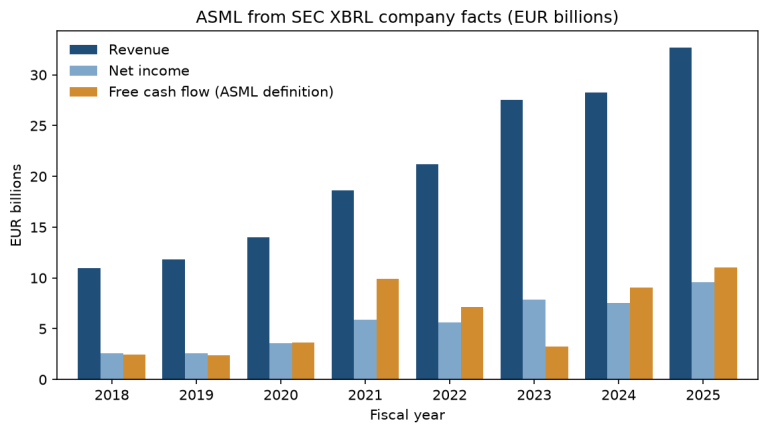
SEC: 1 request, 626 concepts; revenue 2025: EUR 32.67 billion (20-F, filed 2026-02-25)One request returned 626 reported concepts for ASML, and the revenue line for fiscal 2025, €32.7 billion, is the net sales total in ASML’s 2025 annual report on Form 20-F. ASML reports in euros, so the units key for this revenue concept is EUR, and code written for US filers that looks for USD finds nothing there. The SEC has limits too. Its fair access page sets a maximum of 10 requests per second and asks every script to declare a contact. The SEC EDGAR API tutorial rebuilds full statements this way, and the XBRL parser post works through the same ASML filing in more detail.
What can go wrong
A 429 on the first request. Check the session first, as in Step 1. Remove the session argument, upgrade yfinance and curl_cffi together, and check that type(yf.data.new_session()) is a curl_cffi class. If curl_cffi cannot be installed on your platform, yfinance 1.4.0 and later fall back to plain requests, and the library’s own notes warn that Yahoo may block that client.
curl_cffi upgrades. The yfinance changelog has 1.2.1 forcing curl_cffi 0.15 or later because of a CVE and 1.5.2 fixing “yfinance breaking with curl_cffi>=0.16”. Pin both packages in a project you rerun, and upgrade them as a pair.
The error you see is a different one. With hide_exceptions on, a failed request can come back as an empty DataFrame, and the traceback you get is from whichever later line first needed the data. Set yf.config.debug.hide_exceptions = False and yf.config.debug.logging = True when something looks wrong, and read the status codes, as the counting session above does.
Cached data goes stale or wrong. A pickle written during an outage, or one written by older code, is served forever. Keep the empty-frame check before every write, and put the code version in the cache folder name when you change what you store.
Terms of use. The yfinance README says the project is not affiliated with Yahoo, is “intended for research and educational purposes” and tells users to read Yahoo’s terms “for details on your rights to use the actual data downloaded”. That matters as soon as you publish or share what you downloaded.
What to watch
yfinance 1.8.0 came out on PyPI on 3 November 2026, four days before this test; the code here ran on 1.7.0. The 1.8.0 changelog adds the threads=N cap for yf.download() and a fix that lets ticker lookups recover after a bad response. Rerun the request counts after upgrading: the log shows any change in how the library fetches cookies and crumbs. The endpoint paths in the log (v8/finance/chart, v10/finance/quoteSummary) are Yahoo’s and can change without notice; a new 401 or 404 in the counting session is the early sign. On the SEC side, ASML’s annual report for fiscal 2026 on Form 20-F will add a year to the companyfacts file, and the site’s ASML deep dive covers the business behind the numbers. Earlier posts on this site such as the RSI tutorial and the peer company analysis show the analysis side once the data is in hand.
My longer company research is published on the newsletter Sector Playbook, which is available by email subscription.
Sources
yfinance 1.7.0 source: _http.py, data.py and the README. yfinance documentation: Config and Caching. yfinance changelog and release history on PyPI. ASML 2025 annual report on Form 20-F, filed 25 February 2026. SEC, EDGAR application programming interfaces. SEC, Accessing EDGAR data.
Time: 15 minutes. Python 3.12.14, pandas 3.1.0, requests 2.34.2, yfinance 1.7.0, curl_cffi 0.16.3 (installed with yfinance). API key: none; yfinance needs no key, and the SEC only asks for a name and email address in the User-Agent header. Tested 7 November 2026.
Disclaimer
This article is general information about a listed company, written for educational purposes. It is not investment advice and not a personal recommendation to buy, sell or hold any security, and it does not take into account anyone’s financial situation or objectives. I am not a registered investment adviser or a licensed financial services provider. Figures come from company filings and the other sources linked in the text, as of the dates given, and may have changed since. I may hold positions in the securities discussed; see the disclosure above. Investment decisions call for independent research or the advice of a licensed professional.
This is my own research, done with the help of AI tools.