How to use the SEC EDGAR API in Python (no API key)
Disclosure: I have no position in GOOGL. I also hold diversified funds (IWDA, QQQ, SPY, VWRL) that may include some of these companies. Positions checked on 24 October 2026.
The Python below calls the SEC EDGAR API and rebuilds the main lines of Alphabet’s income statement, balance sheet and cash flow statement for the last four fiscal years. No API key, no paid data, no scraping. Its revenue line for fiscal 2025 reads $402.8 billion, the same figure Alphabet reports in its 2025 annual report on Form 10-K.
Time: 15 minutes. Python 3.12.14, matplotlib 3.11.2, pandas 3.1.0, requests 2.34.2. API key: none, the SEC only asks for a name and email address in the User-Agent header. Tested 24 October 2026.
Change the ticker and the five steps return these lines for most 10-K filers as pandas DataFrames, once you have checked which XBRL tags the company uses.
Step 1: call the SEC EDGAR API from Python
Every 10-K and 10-Q carries its financial statements twice: once as the document people read, and once as XBRL, tagged numbers a program can read. The SEC publishes those tagged numbers through free JSON endpoints on data.sec.gov. Its API documentation says plainly that they “do not require any authentication or API keys.” What the SEC does ask, in its fair access rules, is that scripts declare a User-Agent with a contact and stay under 10 requests per second.
import os
import requests
import pandas as pd
import matplotlib.pyplot as plt

# The SEC asks every script to identify itself. Set your own contact first:
#   export SEC_USER_AGENT="Your Name you@example.com"
HEADERS = {"User-Agent": os.environ["SEC_USER_AGENT"]}


def company_facts(ticker):
    """Every XBRL fact a company has filed, from the SEC's free companyfacts API."""
    tickers = requests.get("https://www.sec.gov/files/company_tickers.json", headers=HEADERS, timeout=30).json()
    cik = next(v["cik_str"] for v in tickers.values() if v["ticker"] == ticker)
    url = f"https://data.sec.gov/api/xbrl/companyfacts/CIK{cik:010d}.json"
    return requests.get(url, headers=HEADERS, timeout=30).json()


facts = company_facts("GOOGL")
print(facts["entityName"], "-", len(facts["facts"]["us-gaap"]), "us-gaap concepts")
Alphabet Inc. - 543 us-gaap conceptsTwo requests do all the work. The first downloads the SEC’s ticker file, which maps every ticker to a CIK, the number EDGAR uses to identify a filer (padded to ten digits in the URL). The second downloads the companyfacts file for that CIK: every company-wide value Alphabet has tagged with a standard taxonomy, 543 US GAAP concepts in all, from revenue to the fair value of its debt securities. Company-specific tags and segment breakdowns stay out of this file, according to the SEC, so segment revenue needs the filing itself. Inside, each concept holds a list of facts, and each fact records the value, the period it covers (start and end), the form it came from (10-K, 10-Q), the filing date and the accession number of the filing.
Step 2: turn raw facts into fiscal years
The raw list repeats itself. A 10-K reports the current year and repeats the prior two, so Alphabet’s 2023 revenue appears in three different annual reports. Some 10-Ks also carry quarterly figures in their notes. The function below keeps full-year values from 10-K filings, and when a period was reported more than once it keeps the most recent filing, which is the one that includes any restatement.
def annual(facts, concept, unit="USD"):
    """Fiscal-year values from 10-K filings, latest filing wins, indexed by period end."""
    rows = facts["facts"]["us-gaap"].get(concept, {}).get("units", {}).get(unit, [])
    df = pd.DataFrame(rows)
    if df.empty:
        return pd.Series(dtype=float)
    df = df[(df["form"] == "10-K") & (df["fp"] == "FY")]
    if "start" in df:  # flows (income, cash flow) must cover a full year; balances have no start date
        days = (pd.to_datetime(df["end"]) - pd.to_datetime(df["start"])).dt.days
        df = df[days.isna() | days.between(350, 380)]
    df = df.sort_values("filed").drop_duplicates("end", keep="last")
    return df.set_index("end")["val"]


def line(facts, *concepts):
    """One statement line; later concepts fill years the earlier ones miss (companies rename tags)."""
    out = pd.Series(dtype=float)
    for c in concepts:
        out = out.combine_first(annual(facts, c))
    return out


def statement(facts, lines, years=4):
    """A statement as a table: rows are line items, columns are fiscal years, values in $ billions."""
    table = pd.DataFrame({name: line(facts, *concepts) for name, concepts in lines.items()})
    table = table.dropna(how="all").tail(years)
    table.index = pd.to_datetime(table.index).year
    return table.T / 1e9
The filter on fp == "FY" alone is unreliable, because fy and fp describe the filing, while start and end describe the number. That is why the function measures the period itself: a flow such as revenue has to span roughly a year, and a balance such as total assets has no start date at all. The line helper exists because companies change tags; the section on what can go wrong shows a real case from Alphabet.
Step 3: build the income statement, balance sheet and cash flow
Each statement is a short dictionary: the line item you want and the XBRL concepts that can hold it, in order of preference.
INCOME = {
    "Revenue": ["Revenues", "RevenueFromContractWithCustomerExcludingAssessedTax"],
    "Cost of revenue": ["CostOfRevenue"],
    "R&D": ["ResearchAndDevelopmentExpense"],
    "Operating income": ["OperatingIncomeLoss"],
    "Net income": ["NetIncomeLoss"],
}
BALANCE = {
    "Cash": ["CashAndCashEquivalentsAtCarryingValue"],
    "Total assets": ["Assets"],
    "Total liabilities": ["Liabilities"],
    "Long-term debt": ["LongTermDebtNoncurrent", "LongTermDebtAndCapitalLeaseObligations"],
    "Shareholders' equity": ["StockholdersEquity"],
}
CASH_FLOW = {
    "Operating cash flow": ["NetCashProvidedByUsedInOperatingActivities"],
    "Capital expenditure": ["PaymentsToAcquirePropertyPlantAndEquipment"],
    "Buybacks": ["PaymentsForRepurchaseOfCommonStock"],
}

income = statement(facts, INCOME)
balance = statement(facts, BALANCE)
cash_flow = statement(facts, CASH_FLOW)
cash_flow.loc["Free cash flow"] = cash_flow.loc["Operating cash flow"] - cash_flow.loc["Capital expenditure"]
for title, table in [("Income statement", income), ("Balance sheet", balance), ("Cash flow", cash_flow)]:
    print(f"\n{title} ($ billions)\n{table.round(1)}")
Income statement ($ billions)
2022 2023 2024 2025
Revenue 282.8 307.4 350.0 402.8
Cost of revenue 126.2 133.3 146.3 162.5
R&D 39.5 45.4 49.3 61.1
Operating income 74.8 84.3 112.4 129.0
Net income 60.0 73.8 100.1 132.2
Balance sheet ($ billions)
2022 2023 2024 2025
Cash 21.9 24.0 23.5 30.7
Total assets 365.3 402.4 450.3 595.3
Total liabilities 109.1 119.0 125.2 180.0
Long-term debt 14.7 11.9 10.9 46.5
Shareholders' equity 256.1 283.4 325.1 415.3
Cash flow ($ billions)
2022 2023 2024 2025
Operating cash flow 91.5 101.7 125.3 164.7
Capital expenditure 31.5 32.3 52.5 91.4
Buybacks 59.3 61.5 62.2 45.7
Free cash flow 60.0 69.5 72.8 73.3Revenue grew 15% in fiscal 2025 to $402.8 billion, with an operating margin of 32.0%. Operating cash flow reached $164.7 billion, yet free cash flow, computed here as operating cash flow minus purchases of property and equipment, came to only $73.3 billion, because capital expenditure went from $52.5 billion to $91.4 billion in a year. Long-term debt moved from $10.9 billion to $46.5 billion. The 10-K explains both: Alphabet says it is scaling its technical infrastructure “in particular for AI” and expects to spend significantly more in 2026, and it issued senior unsecured notes for net proceeds of $37.3 billion during 2025 (10-K, Management’s Discussion and Analysis). Free cash flow has its own tutorial on this site, with the adjustments this simple version leaves out.
Step 4: check the numbers against the 10-K
Code that pulls numbers is only useful if the numbers are right, so trace one back to its filing. Every fact carries the accession number of the filing it came from, and the accession number gives the filing’s folder on EDGAR.
rev = facts["facts"]["us-gaap"]["Revenues"]["units"]["USD"]
latest = max((r for r in rev if r["form"] == "10-K" and r["fp"] == "FY"), key=lambda r: (r["filed"], r["end"]))
print(latest["end"], latest["val"], latest["accn"], latest["filed"])
folder = latest["accn"].replace("-", "")
print(f"https://www.sec.gov/Archives/edgar/data/{facts['cik']}/{folder}/")
2025-12-31 402836000000 0001652044-26-000018 2026-02-05
https://www.sec.gov/Archives/edgar/data/1652044/000165204426000018/The folder holds the 10-K filed on 5 February 2026. Its consolidated statement of income lists revenues of $402,836 million, which matches the $402,836 million the code printed. The same check on capital expenditure lands on the “Purchases of property and equipment” line of the cash flow statement. Do this once for every new company and every new concept. It takes a minute, and it catches most of the problems in the next section before they reach a chart.
Step 5: chart it
chart = pd.DataFrame({"Revenue": income.loc["Revenue"], "Operating income": income.loc["Operating income"],
                      "Free cash flow": cash_flow.loc["Free cash flow"]})
chart.plot.bar(figsize=(8, 4.5), rot=0, color=["#1f4e79", "#5b9bd5", "#a9c7e8"])
plt.title("Alphabet: revenue, operating income and free cash flow ($ billions)")
plt.xlabel("Fiscal year")
plt.tight_layout()
plt.savefig("googl-chart.png", dpi=150)

year = income.columns[-1]
figures = {
    "fy_latest": int(year),
    "concepts": len(facts["facts"]["us-gaap"]),
    "revenue": float(income.loc["Revenue", year]) * 1e9,
    "revenue_growth": float(income.loc["Revenue", year] / income.loc["Revenue", year - 1] - 1),
    "operating_margin": float(income.loc["Operating income", year] / income.loc["Revenue", year]),
    "net_income": float(income.loc["Net income", year]) * 1e9,
    "long_term_debt": float(balance.loc["Long-term debt", year]) * 1e9,
    "long_term_debt_prior": float(balance.loc["Long-term debt", year - 1]) * 1e9,
    "operating_cash_flow": float(cash_flow.loc["Operating cash flow", year]) * 1e9,
    "capex": float(cash_flow.loc["Capital expenditure", year]) * 1e9,
    "capex_prior": float(cash_flow.loc["Capital expenditure", year - 1]) * 1e9,
    "free_cash_flow": float(cash_flow.loc["Free cash flow", year]) * 1e9,
    "revenue_exact": float(latest["val"]),
}
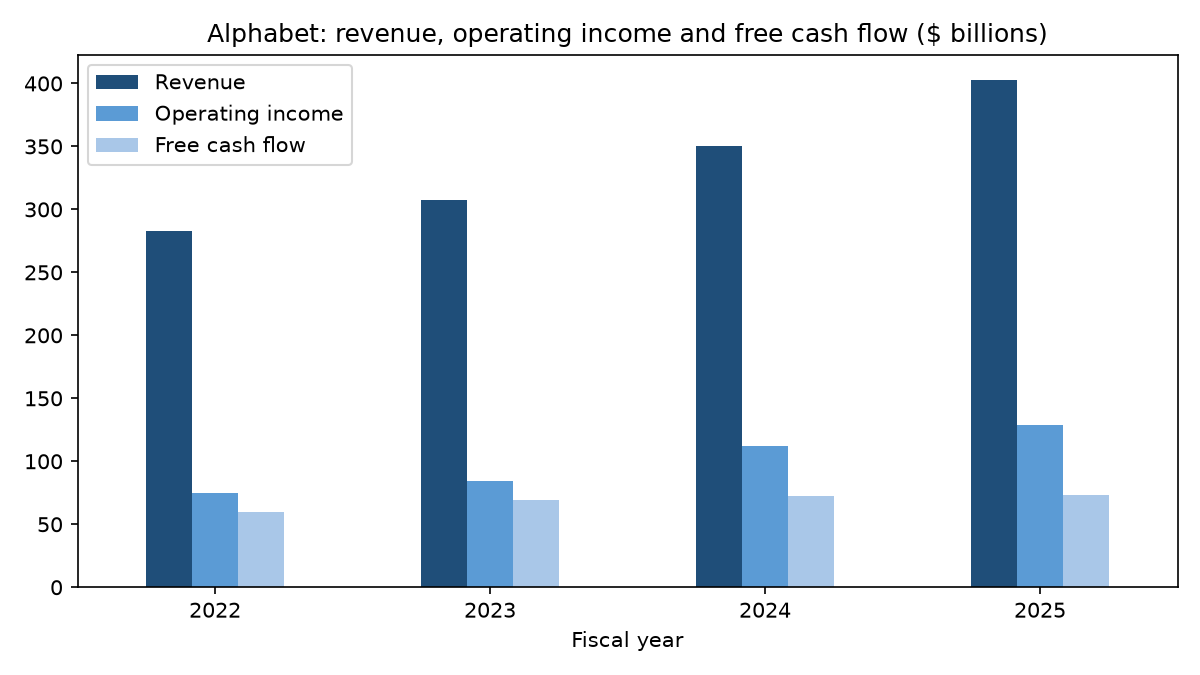
The chart at the top of this post is this code’s output. The figures dictionary collects the computed numbers quoted in the text, so each of those comes straight from the run; figures taken from the 10-K’s text, such as the note proceeds and the debt breakdown, link to the filing.
What can go wrong
A 403 error on the first request. EDGAR refuses requests without a declared User-Agent. Set SEC_USER_AGENT to your name and email address before running anything, and keep loops under the 10 requests per second the fair access page allows; a short time.sleep(0.2) between companies is enough.
A concept that stops halfway. Alphabet tagged revenue as RevenueFromContractWithCustomerExcludingAssessedTax in its 2022 to 2024 10-Ks and as Revenues in the 2025 10-K, and its company facts show it switching between the two tags in earlier years as well. Ask for Revenues alone and 2022 drops out of the four-year table; ask for the older tag alone and the series silently ends in 2024. The line helper takes both and fills the gaps. To see which tags a company uses, search the keys: [c for c in facts["facts"]["us-gaap"] if "Revenue" in c].
Two tags that do not mean the same thing. For 2022, Alphabet has no LongTermDebtNoncurrent value; that year’s long-term debt sits under LongTermDebtAndCapitalLeaseObligations, a tag that also covers lease obligations, so the fallback fills the gap with a different definition. The debt note in the 2023 10-K shows the 2022 figure of $14.7 billion includes about $1.8 billion of finance lease and other obligations alongside $13.0 billion of notes, and the 2024 10-K reports finance lease liabilities under other long-term liabilities. Notes outstanding stayed at $13.0 billion at both year-ends; the fall from 2022 to 2023 in the table comes from the change of definition and from $1.0 billion of notes due within a year moving into current debt. When a fallback tag carries a different definition, say so next to the number.
The fy field. It holds the fiscal year of the filing that reported the value. The 2024 revenue repeated in the 2025 10-K is labelled fy 2025. Index by end (or by start and end for flows) and the problem disappears.
Quarters. The SEC’s rule 13a-13 requires a 10-Q for the first three quarters only, so a fourth-quarter flow usually has to be derived as the full year minus the nine-month figure. Filter quarterly flows by a period of about 90 days as well, since 10-Qs also report year-to-date values.
Foreign filers. A company that files a 20-F under IFRS keeps its numbers under the ifrs-full taxonomy, often in its home currency. SAP’s company facts have no us-gaap section at all and report revenue in EUR. For such a company, read facts["facts"]["ifrs-full"], pass unit="EUR" and change the form filter in annual from 10-K to 20-F. Some foreign filers use US GAAP instead: ASML’s company facts hold only us-gaap and dei facts, so check the keys of facts["facts"] first.
Two tickers, one company. GOOGL and GOOG share one CIK in the SEC’s ticker file, so either ticker returns the same companyfacts file.
What to watch
The XBRL APIs typically update within a minute of a filing being disseminated, according to the SEC’s API documentation, so rerunning the code after Alphabet’s next 10-K picks up the new fiscal year; the code reads annual figures only. A new annual report can also introduce a different tag, as Alphabet’s 2025 report did with revenue, so rerun the Step 4 check whenever a new 10-K arrives. Capital expenditure is the line to follow for Alphabet in particular, given the increase the 2025 10-K says is planned for 2026.
For the ratios you can build on these DataFrames, see the earlier posts on retrieving financial statements with Python, profitability ratios and debt to equity. For the business behind the numbers, see what drives Alphabet’s growth.
My longer company research is published on the newsletter Sector Playbook, which is available by email subscription.
Sources
Alphabet 2025 annual report on Form 10-K, filed 5 February 2026. SEC, EDGAR application programming interfaces. SEC, Accessing EDGAR data. SEC company facts for Alphabet (CIK 1652044).
Disclaimer
This article is general information about a listed company, written for educational purposes. It is not investment advice and not a personal recommendation to buy, sell or hold any security, and it does not take into account anyone’s financial situation or objectives. I am not a registered investment adviser or a licensed financial services provider. Figures come from company filings and the other sources linked in the text, as of the dates given, and may have changed since. I may hold positions in the securities discussed; see the disclosure above. Investment decisions call for independent research or the advice of a licensed professional.
This is my own research, done with the help of AI tools.